FeetFinder Profile Picture Guide: What Should Sellers Use?
Your FeetFinder profile picture does not need to be complicated. Its job is to help someone recognize your profile quickly and understand the type of creator they are looking at.
For many sellers, that means a clear photo of their feet, footwear, soles, or another genuine image that fits their content style. You do not have to show your face just to have a useful FeetFinder profile picture.
FeetFinder's current Seller Agreement says that any profile picture or avatar used on a seller profile must accurately reflect the seller's appearance. In other words, your main profile image should genuinely represent you rather than being a misleading stock photo or someone else's image.
If you are building your entire account from the beginning, our FeetFinder seller guide covers the full setup process.
Quick Answer: What should my FeetFinder profile picture be? A good FeetFinder profile picture should be clear enough to recognize at a small size, relevant to the content you actually sell, well lit, easy to distinguish from a busy background, genuinely yours, consistent with the rest of your profile, and free of personal details you do not want buyers to see.
Your picture can show your feet without showing your face. FeetFinder's current seller guide also says that a seller's profile photo does not need to show their face, and recommends using a clear, well-lit image that represents the seller's actual content style.
Key Takeaways
-
Your avatar's job is recognition, not perfection. It should read clearly at thumbnail size.
-
A feet, soles, or footwear image is the simplest choice, and it never has to include your face.
-
The Seller Agreement requires the avatar to accurately reflect you, so no stock photos or other people's images.
-
Match the picture to the niche buyers will actually browse, and check the background for identifying details.
-
The avatar gets someone through the door. Your bio, username, and gallery are what keep them there.
Should Your FeetFinder Profile Picture Be Feet?
It can be, and for many sellers that is the simplest choice. If you sell feet content, showing your feet immediately tells a visitor what kind of profile they have landed on.
But your profile picture does not need to be the same type of plain feet photo that you would sell as a standalone listing. Think of it more like a recognizable creator image.
For example, you might use a clean sole shot, a feet-and-heels photo, a polished pedicure image, feet in socks, a close-up that matches your niche, or a wider feet-focused lifestyle image.
The best option depends on what you want a buyer to associate with your profile. If most of your content is heels and stockings, a barefoot beach image may look disconnected.
If your profile focuses on natural barefoot content, an elaborate studio heels shot may create the wrong expectation. Your profile picture should match the profile buyers are about to browse.
7 FeetFinder Profile Picture Ideas
You do not need to copy another seller's avatar. Use these as starting points and adapt them to your own content.
1. A Clean Feet Close-Up
A simple close-up is one of the easiest options. Keep the feet in focus and remove unnecessary distractions from the background. This works particularly well if your profile covers several different niches and you do not want the avatar to make the account look limited to one theme.
2. A Soles-Focused Profile Picture
If soles are an important part of your content, they can become part of your visual identity. Use an angle that still works when the image is cropped into a smaller profile-photo area. That means the subject should not disappear when the image is reduced.
3. A Footwear-Based Photo
Shoes can make an avatar easier to recognize. Depending on your content, that could include heels, sneakers, boots, sandals, or socks. Use footwear that actually appears in your listings rather than choosing something only because it looks eye-catching.
4. A Pedicure Or Nail-Focused Image
If nail colors, pedicures, or polished feet are part of your profile, the profile picture can reflect that. Strong contrast between the nail color and background can also help the image remain recognizable on mobile.
5. A Simple Lifestyle Shot
Not every profile image needs a studio backdrop. A clean image taken on a couch, beside a pool, outdoors, on a bed, at a desk, or in a simple indoor setting can work well if the background does not compete with the feet. Be careful with identifiable objects or location clues.
6. An Anonymous Feet-Only Profile Picture
If you want buyers to know as little as possible about your offline identity, keep the image tightly focused. Avoid showing your face, documents, house numbers, work uniforms, family photos, license plates, or identifiable reflections.
If privacy is a priority, read our full guide on how to sell feet pictures anonymously.
7. A Consistent Signature Style
One of the easiest ways to make a profile recognizable is consistency. That does not require a logo. You might repeatedly use similar backgrounds, the same type of lighting, a recognizable nail color, similar footwear, or the same photographic mood. Then your avatar feels connected to the rest of your gallery.
Got Your Profile Picture Ready?
Verify privately, build your profile, and list the content you already have. You keep up to 90% of every sale.
Start Selling on FeetFinder →What Makes A Good Feetfinder Profile Picture?
A technically perfect photograph is not necessary. Several simpler qualities matter more.
The subject is easy to see. Do not make a buyer search the image to figure out what they are looking at. The feet should be obvious even when the avatar appears small.
The photo is sharp enough. A little softness is not a problem. A badly blurred or pixelated avatar can make an otherwise complete profile look unfinished.
The lighting looks intentional. Natural window light can work perfectly well. You do not need professional equipment just to create a profile photo. Avoid lighting that makes the important part of the image difficult to see.
The background is not distracting. Busy bedrooms, clutter, laundry, documents, screens, or unrelated objects can take attention away from the subject. A clean background usually works better.
The picture matches your content. If your avatar suggests one niche while every paid listing shows something completely different, the profile can feel inconsistent.
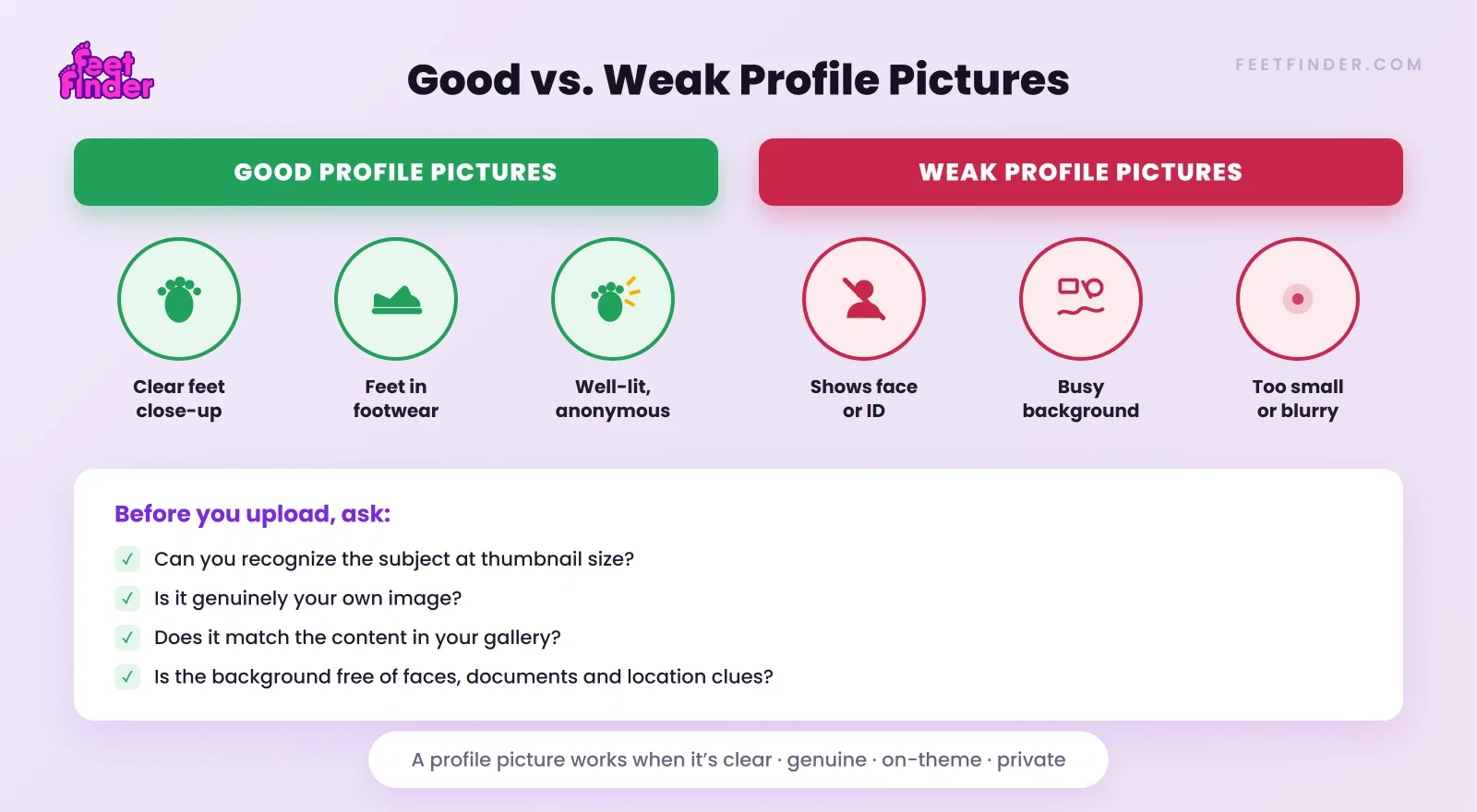
It still works on mobile. Most avatars are displayed quite small. Before keeping a picture, look at it as a thumbnail. If the subject becomes impossible to recognize, crop it differently.
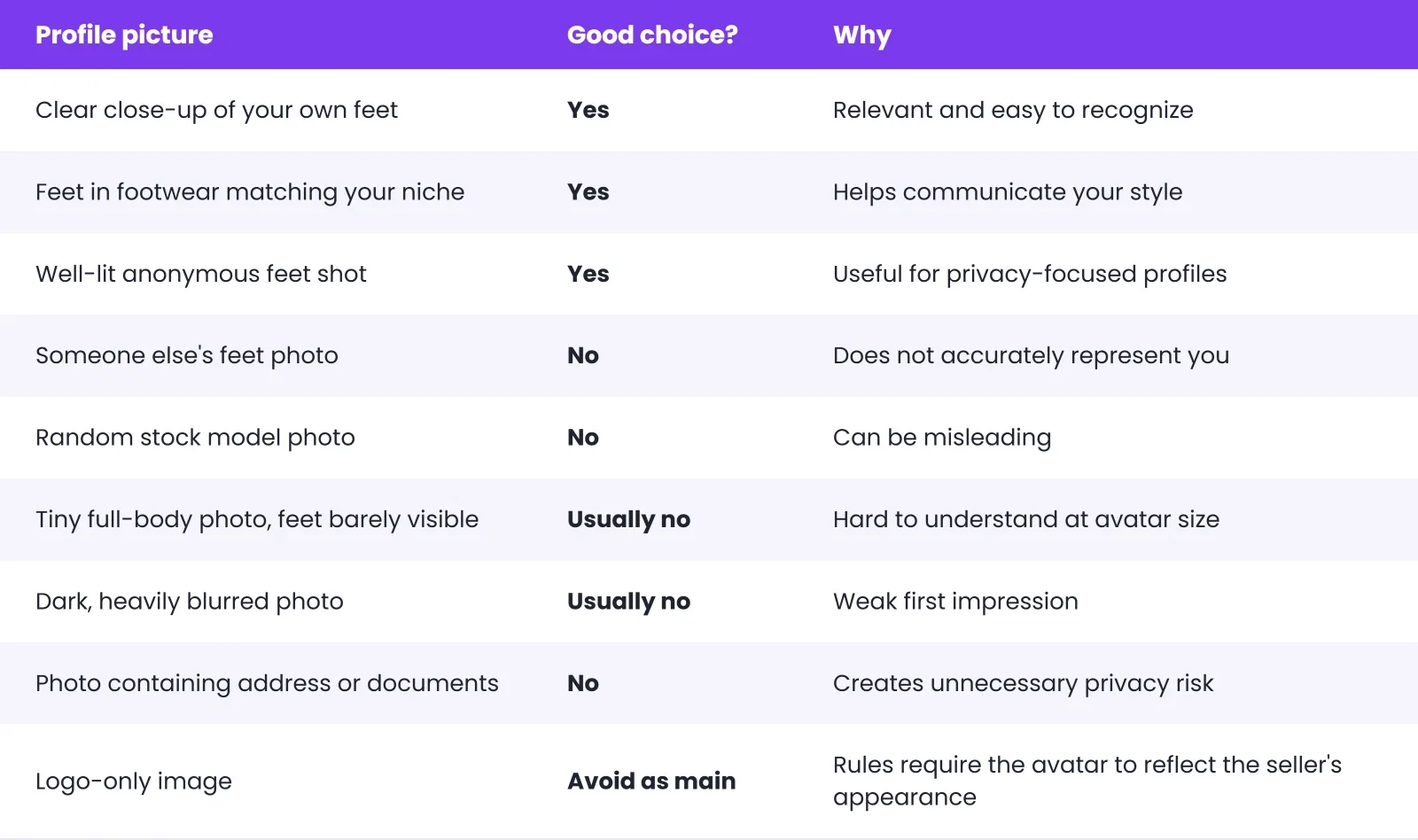
Feetfinder Profile Picture Examples: What Works And What Does Not?
Here is a simple way to evaluate an image before using it.
Do You Need To Show Your Face In A Feetfinder Profile Picture?
No. The current FeetFinder seller guidance says the profile photo does not need to show your face. That is different from account verification. FeetFinder sellers still have to complete the private age and identity checks required by the platform.
Your public seller profile and the information used privately to verify your account are not the same thing. So you can protect your public identity while still using a genuine profile photo.
How To Choose A Profile Picture Without Revealing Your Identity
If anonymity matters to you, look beyond the face. People sometimes remove their face from a photo but accidentally leave more revealing information in the background.
Before uploading your picture, zoom in and check for mirrors, windows, letters or packages, vehicle registration plates, school or work branding, family photos, computer screens, unique tattoos, street signs, and house numbers.
Also think about usernames. Using the same uncommon username on FeetFinder and your personal Instagram can make accounts easier to connect. For creator-name ideas, see our FeetFinder Username Ideas.
Feetfinder Profile Picture Vs Cover Photo
These two images should not have exactly the same job.

Your profile picture should remain recognizable when it is shown small. A cover photo has more horizontal space and can give additional context.
For example, a profile picture might be a close-up of feet in black heels, while the cover photo is a wider image using the same heels, background, and overall style.
That makes the two images feel related without simply uploading the same file twice.
What Should You Use For A Feetfinder Cover Photo?
A useful cover image should support your profile rather than overpower it. Good options include a wider version of your main content style, a clean feet-and-footwear photo, a tasteful arrangement of props you actually use, a wider soles or pedicure image, an anonymous lifestyle scene, or a simple image with enough empty space to crop well.
Do not feel that you need to fill every inch of the cover photo. Cleaner images often adapt better to different screen sizes.
A note about cover photo size: We would not publish an exact FeetFinder cover-photo or banner dimension unless the current product specification is confirmed. The public FeetFinder material reviewed for this update does not provide a reliable current dimension we would want to hard-code into an evergreen guide.
A better instruction for sellers is simple: upload a clear, high-resolution image and check the current crop and preview inside your FeetFinder profile before saving it.
Feetfinder Cover Photo Ideas
If you are stuck, keep the profile and cover photo visually connected.
Same style, wider frame. Use the same setting or footwear as the avatar but take a wider photograph for the banner.
Showcase more than one theme. If you post several related niches, the cover image can hint at them without becoming cluttered.
Use a clean background. A neutral wall, bedsheet, floor, sofa, or outdoor setting can work.
Leave room for cropping. Do not place the important detail at the extreme edge of the image. Different devices may display the banner differently.
What Does A Feetfinder Seller Profile Look Like?
A profile is more than one picture. FeetFinder's current Master Guide describes seller profiles as including areas such as Media, Store, About, and Links, along with buyer actions including Follow, Tip, Offer, and Message.
That is why a good profile picture should be thought of as the entrance to the profile, not the whole profile.
A buyer can still look at your bio, content, store, account information, offers, and other profile details. So do not spend hours trying to create the "perfect" avatar while leaving the rest of the account unfinished.
Complete Your Feetfinder Profile, Not Just The Picture
Your image attracts attention, but the rest of the profile tells buyers what you offer.
Write a useful bio. We already have a dedicated guide covering that. Read FeetFinder Bio Ideas for examples and profile-writing advice.
Pick a username buyers can remember. A short, easy-to-read name is generally easier to recognize again.
Add content that matches your profile. The avatar should not be the only strong image on the page. Once somebody clicks your profile, the available content should feel like the same creator.
Profile Picture Mistakes To Avoid
-
Using someone else's image. Your profile should represent you. Do not take an image from Google, Pinterest, Instagram, or another creator and use it as your seller avatar. FeetFinder's Seller Agreement specifically requires the profile image to accurately reflect the seller's appearance.
-
Making the image too busy. When the avatar becomes small, detailed backgrounds often turn into visual noise. Keep the main subject obvious.
-
Revealing personal information. Check every corner before uploading.
-
Copying another seller. You can look at other profiles for inspiration, but your profile should not look like an imitation of somebody else's brand.
-
Using a picture that does not match your niche. A buyer should not feel surprised when they move from your avatar to your content gallery.
-
Constantly changing your avatar. Refreshing an outdated picture is fine. Changing your identity image every few days can make your account less recognizable to returning visitors.
How Often Should You Update Your Profile Picture?
There is no public FeetFinder rule saying a seller must change their profile picture every week, month, or year. Change it when there is a reason.
For example, your niche changed, the old picture is low quality, your styling has changed substantially, the image no longer represents your content, or you have a noticeably stronger replacement.
Do not change it just because you think Google or FeetFinder wants "freshness." Google's own people-first guidance says changing dates or adding content only to make a page look fresh is not a useful search strategy.
The same common-sense principle applies here: update something because it improves the experience, not simply for the sake of changing it.
How To Take A Better Feetfinder Profile Picture
You do not need a photography course. Try this simple setup.
Step 1: Find good light. Stand or sit near a window. Avoid harsh overhead lighting if it creates distracting shadows.
Step 2: Clean the background. Move unrelated items out of the frame.
Step 3: Take several angles. Do not rely on the first picture. Try front, side, soles, feet together, footwear, and slightly wider framing.
Step 4: Check the thumbnail. Crop the image down and see whether it still makes sense.
Step 5: Check privacy. Look at the background one more time.
Step 6: Choose the image that best matches your profile. The prettiest photo is not automatically the most useful avatar. Pick the one that represents what buyers will actually find on your page.
For broader seller photography ideas, see FeetFinder Tips and Tricks.
Should Male Sellers Use A Different Type Of Profile Picture?
Not necessarily.
The same basic rules apply: a genuine image, a clear subject, a good crop, a consistent niche, and appropriate privacy.
A male seller does not need to force a particular "masculine" style because of gender.
Choose the picture that represents the content you actually make. If you want male-specific seller guidance, read How to Sell Feet Pics as a Man.
Does A Better Profile Picture Guarantee More Sales?
No. A better profile picture can make your profile clearer and more polished, but FeetFinder does not publish evidence showing that changing an avatar alone will increase sales by a specific percentage.
Your actual results can also depend on content, pricing, buyer demand, profile completeness, categories, descriptions, communication, and repeat customers.
Treat the profile picture as one part of a complete seller profile rather than a sales hack.
Frequently Asked Questions
What Should My Feetfinder Profile Picture Be?
Use a clear, genuine picture that represents you and the type of content you post. For many sellers, a feet-focused image is the simplest option.
Should The Profile Pic On Feetfinder Be Feet?
It can be. A feet-focused profile picture makes the purpose of the account clear, but it does not need to show your face.
What Kind Of Profile Picture Should I Use For Feetfinder?
Choose an image that remains recognizable at a small size, matches your niche, is well lit, and does not reveal personal information you want to keep private.
Can I Use A Picture Without Showing My Face?
Yes. FeetFinder's current seller guidance states that a profile picture does not need to show your face.
Can I Use A Stock Image For My Feetfinder Profile Picture?
You should use an image that genuinely represents you. FeetFinder's Seller Agreement says a profile picture or avatar must accurately reflect the seller's appearance.
What Is A Good Feetfinder Cover Photo?
Use a clear, wider image that complements your profile picture and content theme. Keep important details away from the edges because cropping may vary.
What Size Should A Feetfinder Cover Photo Be?
We would not publish an exact dimension without confirming the current product specification. Use a clear, high-resolution image and check the live crop preview in your account.
What Does A Feetfinder Seller Profile Look Like?
FeetFinder's current seller guide describes profile sections including Media, Store, About, and Links, along with buyer actions such as Follow, Tip, Offer, and Message.
How Do I Make My Feetfinder Profile Stand Out?
Start with a clear profile picture, complete your bio and profile information, use a memorable username, organize your content, and keep your visual style consistent.
Should I Change My Feetfinder Profile Picture Often?
Only when a new image represents your account better. There is no reason to change it on a fixed schedule.
Bottom Line
A good FeetFinder profile picture does not need professional equipment, your face, or a complicated design. It needs to feel like your profile.
Use a genuine image, keep the main subject clear, match it to your content, check how it looks when cropped small, and remove anything that reveals personal information you would rather keep private.
Then spend time on the rest of your account too. Your profile picture gets someone through the door. Your bio, username, gallery, store, and content give them a reason to stay.
Profile Ready? Move From Setup to Selling
Verify privately, publish your first sets, and keep up to 90% of every sale on FeetFinder.
Start Selling on FeetFinder →Reviewed & written by
Trevor
Trevor specializes in creating practical how-to guides for new content creators. His work focuses on profile optimization, attracting buyers, avoiding common mistakes, and understanding platform policies. Rather than relying on marketing claims, he emphas
Knock Knock!! Let Your Feet Earn Money
Join thousands of users who are making money by buying and selling feet pictures in a safe, secure platform. Start your journey today with FeetFinder's trusted marketplace.