FeetFinder Login: Sign In & Fix Common Login Problems
Trying to log in to FeetFinder? Use the official sign-in page below. If the site is not loading, appears to be down, your account is blocked, or you cannot complete verification, the troubleshooting steps further down will help.
LogIn To FeetFinder
The current login form accepts your email address or username plus your password, and it includes a Forgot Password option if you cannot remember your credentials.
Sign In To FeetFinder →Stay Safe: only sign in through the official FeetFinder domain. Avoid login links sent by strangers, buyers, or unofficial "support" accounts, and never share your password with anyone.
Quick Answer: Fixing A FeetFinder Login
If your FeetFinder login is not working, run through these steps in order:
1. Open the official FeetFinder sign-in page.
2. Enter your email address or username.
3. Re-enter your password manually.
4. Use Forgot Password if needed.
5. Make sure JavaScript is enabled.
6. Try a private or incognito browser window.
7. Clear FeetFinder-specific cookies and cache.
8. Check whether FeetFinder itself appears unavailable.
9. Look for verification or account-restriction notices.
10. Contact FeetFinder support if the problem continues.
If you only want to sign in, you do not need the full guide. Open the FeetFinder login page.
How To Log In To FeetFinder
Step 1: Open The Official Login Page
Go directly to app.feetfinder.com/signin, and avoid login links shared by strangers, buyers, or unofficial support accounts. The official portal currently shows fields for Email Address or Username, Password, a Forgot Password link, and a Sign In button.
Step 2: Enter Your Email Or Username
FeetFinder accepts either one. If you normally use your creator username but cannot remember your registered email, sign in with the correct username associated with the account.
Step 3: Enter Your Password
Watch for Caps Lock, old autofilled passwords, accidental spaces, and password-manager entries saved for a different account.
Step 4: Select Sign In
If your details are correct but the account still does not open, work through the troubleshooting sections below.
Is FeetFinder Down Right Now?
Before you change your password or account settings, work out whether the problem affects only your account or device, or the FeetFinder website itself. The two situations have very different fixes.
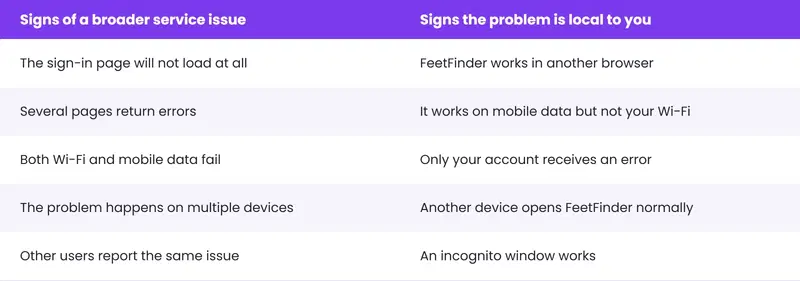
FeetFinder's Terms note that the platform or parts of it may occasionally be unavailable or restricted.
Honest Note: A static blog post cannot reliably tell you whether FeetFinder is up or down at this exact moment. Unless a real-time status tool is added, test the official site yourself on another browser, device, and network before assuming there is a global outage.
FeetFinder Not Working? Try These Fixes
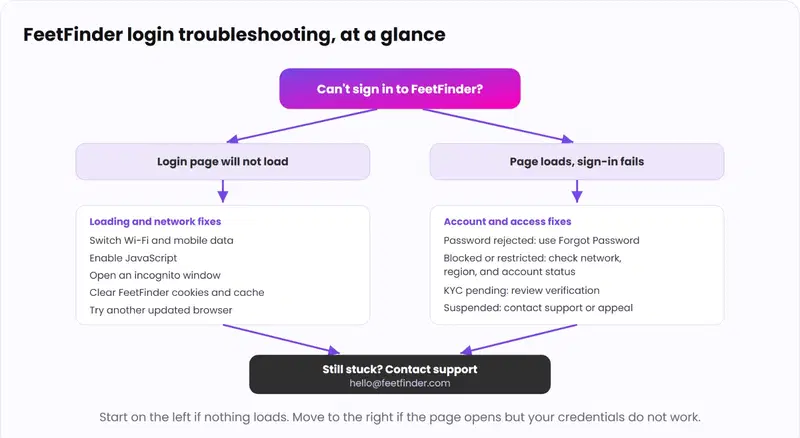
Most login and loading problems come down to a handful of causes. This map shows the fastest route to a fix, depending on whether the page loads at all.
1. Reload The Page
Start simple. Close the tab and reopen the FeetFinder sign-in page. If it was a temporary loading glitch, this may be enough.
2. Check Your Internet Connection
Switch from Wi-Fi to mobile data, or from mobile data to Wi-Fi. If FeetFinder works on one network but not the other, the issue is more likely your connection or network configuration than your password.
3. Enable JavaScript
The FeetFinder login portal requires JavaScript. If it is disabled, the page shows a message like this:
JavaScript is disabled in your browser. Please enable it to continue using this site.
Enable JavaScript in your browser settings and reload the page. Also check any extension that blocks JavaScript, cookies, trackers, or page scripts, and temporarily disable it for FeetFinder to test whether it is the cause.
4. Try Incognito Or Private Browsing
A private window is one of the easiest ways to test whether old browser data is the problem. If FeetFinder works in incognito mode but not your normal window, the likely causes are stale cookies, cached session data, extensions, or saved login information. You can then clear FeetFinder-specific site data instead of wiping your whole history.
5. Clear FeetFinder Cache And Cookies
Old site data can keep a broken login session alive. In your browser settings, clear cookies and cache specifically for feetfinder.com and app.feetfinder.com, then reopen the login page. Clearing cookies will usually log you out, so have your password ready.
6. Try Another Browser
If Chrome is not loading FeetFinder correctly, try Safari, Firefox, Edge, or another updated browser. If it works in the second browser, the issue is likely your original browser's extension, cached data, privacy setting, or JavaScript configuration.
Why Is FeetFinder Blocked Or Restricted?
There is no single reason every user sees a restriction. Common causes include:
-
Network-level adult-content filtering;
-
Parental controls;
-
Workplace or school network policies;
-
Geographic restrictions;
-
Age-verification requirements;
-
Account enforcement;
-
Browser or security software.
FeetFinder's Terms require users to be at least 18, or the age of majority where they live if that is higher, and to comply with local laws on adult-oriented material.
Do not try to bypass restrictions. FeetFinder's Terms specifically prohibit using VPNs, proxies, false identification, or similar methods to get around geographic restrictions or age-verification requirements.
If the site is blocked by a school, workplace, parental-control system, or local legal restriction, follow the applicable network rules rather than trying to bypass them.
Why Does Chrome Block FeetFinder?
Chrome does not necessarily block FeetFinder for every user. If Chrome is stopping access, check whether the message is actually coming from Google Safe Browsing, a browser extension, antivirus software, parental controls, DNS or content filtering, or your organization or school network.
Do not disable important security protections just to force access. First test whether the official FeetFinder domain loads in another legitimate browser or on another network.
FeetFinder Sign-Up Not Working
If you are creating a new seller account and the signup process will not complete:
1. Make sure JavaScript is enabled;
2. Enter a valid email address;
3. Confirm your age and country details accurately;
4. Complete any Cloudflare or human-verification check shown;
5. Make sure your browser allows the required cookies and scripts;
6. Try another current browser;
7. Check whether age or identity verification is waiting for action.
For the full seller account process, read the FeetFinder Master Guide.
FeetFinder Password Not Working
If your email or username looks correct but the password keeps being rejected, do not keep guessing. Use Forgot Password instead.
Password Reset Process
1. Open the FeetFinder login page.
2. Select Forgot Password.
3. Enter the email address connected to your account.
4. Check your inbox.
5. Open the official reset message.
6. Create a new password.
7. Sign in again.
No Reset Email?
Check Spam, Junk, and Promotions folders, and any email filters. Make sure you entered the same email address attached to your FeetFinder account.
Can You Change Your Email On FeetFinder?
FeetFinder's Terms say users are responsible for keeping their contact information, including their email address, current and accurate. If your account settings provide an email-change option, use that process.
If you no longer have access to the original email or cannot update it yourself, contact FeetFinder support. Do not create a new account simply because your email address changed.
FeetFinder KYC Or Verification Still In Review
FeetFinder requires age and identity verification for sellers. Its current Age Verification Policy says sellers may need to provide a valid government-issued photo ID and a selfie or biometric match where legally permitted.
If Verification Is Still Pending
Check whether the ID is valid and not expired, the image is clear, all requested fields are complete, your account details match your documents, and whether FeetFinder has emailed you requesting more information.
Do not submit another person's ID or create a second account to bypass verification. For a full walkthrough of seller setup and verification, see the FeetFinder Master Guide.
FeetFinder Login For Sellers And Buyers
Sellers and buyers use the same FeetFinder account portal. There is no separate secret seller-login website. Sign in at app.feetfinder.com/signin with the credentials connected to your account. After you sign in, seller features become available based on your account status and verification.
FeetFinder Login In The UK, Australia, And On Mobile
You do not need a separate UK or Australian FeetFinder login page. Use the normal account portal and follow any location-specific verification or access requirements shown to your account, since FeetFinder's Terms state that age and access requirements can depend on your jurisdiction.
If you are selling from outside the United States, our guide on how to sell feet pics in Canada explains the non-US seller setup in detail.
Is There A FeetFinder App Login?
FeetFinder works in any web browser, including on mobile, and has no app. There is nothing to install.
The safest approach is to sign in through the official domain at app.feetfinder.com rather than downloading a third-party app that claims to provide FeetFinder access.
FeetFinder Account Suspended Or Disabled
If the site loads normally but your credentials still do not provide access, the issue may involve the account itself.
FeetFinder's Terms allow the platform to disable usernames, passwords, or other account identifiers in certain cases, including suspected Terms violations, fraudulent conduct, or illegal activity, and to suspend or delete accounts after investigating suspected noncompliance.
What To Do
Check your registered email, any FeetFinder account notices, and any suspension or appeal information. If you believe a restriction was applied incorrectly, use the official support or appeal process. Do not attempt to bypass it with another person's identity or a new deceptive account.
Think Someone Else Logged Into Your Account?
If you suspect unauthorized access:
1. Reset your FeetFinder password;
2. Change the password on the email account connected to FeetFinder;
3. Sign out on shared devices;
4. Check for unexpected account changes;
5. Contact FeetFinder support.
FeetFinder's Terms require users to keep their login credentials confidential and to notify FeetFinder if they become aware of unauthorized access. Never share your FeetFinder password with a buyer. If a stranger is pressuring you about your login or payout, read our scam prevention guide.
Where Is My FeetFinder Dashboard?
After a successful login, your account features are available through your FeetFinder account. If you sign in but do not see the seller features you expected, check whether you registered as the correct account type, whether seller onboarding is complete, whether identity verification is finished, and whether the account has a restriction.
If the dashboard appears blank or incomplete, try the browser troubleshooting steps above before creating another account.
How To Contact FeetFinder Support
FeetFinder's official contact page currently lists an email address and contact form, with 24/7 availability.
Email: hello@feetfinder.com
Contact page: feetfinder.com/contact
When you contact support, include your username, account email, the exact error message, when the issue began, the browser or device you are using, and a screenshot if it helps. Do not send your password.
Does FeetFinder Have A Customer Service Phone Number?
The official FeetFinder contact page currently lists an email address and contact form, but it does not publicly list a customer-service phone number. Be cautious with phone numbers on random websites claiming to be FeetFinder support, and use the official contact page first.
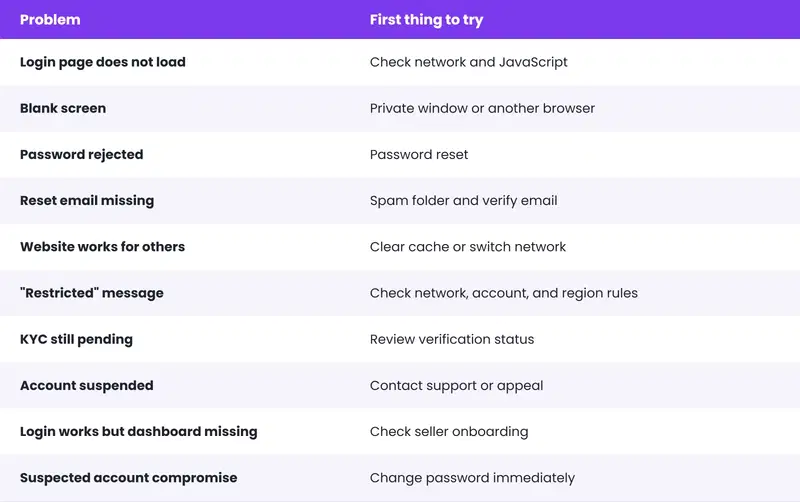
Common FeetFinder Login Errors And What They Usually Mean
What Not To Do When FeetFinder Is Not Working
-
Share your password with someone offering to "fix" the account;
-
Use a buyer-supplied login link;
-
Submit somebody else's ID;
-
Create several duplicate accounts immediately;
-
Pay someone to "unlock" your FeetFinder login;
-
Use tools to bypass age or geographic restrictions;
-
Disable every security protection on your browser without understanding the warning.
If a stranger contacts you about a login, payout, or account problem, read our FeetFinder scam prevention guide.
Frequently Asked Questions
What Is The Official FeetFinderLogin?
Use the official FeetFinder account portal at app.feetfinder.com. The login form accepts an email address or username plus your password.
Is FeetFinder Down?
FeetFinder can occasionally become unavailable, but a static article cannot confirm a live outage. Test the official site on another browser, device, and network before assuming there is a global outage.
Why Is FeetFinder Not Working?
Possible reasons include a temporary outage, connection problems, disabled JavaScript, browser cache, extensions, network restrictions, verification requirements, or an account restriction.
Why Is FeetFinder Not Loading?
Check your network first, make sure JavaScript is enabled, try incognito mode, clear site data, and try another updated browser.
Why Is FeetFinder Blocked?
The restriction could come from your network, parental controls, workplace or school policies, local access rules, age verification, or your account status.
Can I Use A VPN To Access FeetFinder?
FeetFinder's Terms prohibit using VPNs or similar tools to circumvent geographic restrictions or age-verification requirements.
How Do I Reset My FeetFinder Password?
Use the Forgot Password option on the official sign-in page and follow the instructions sent to the email attached to your account.
Can I Login Using My Username?
Yes. The FeetFinder sign-in page accepts an email address or username.
How Do I Change My FeetFinder Email?
Keep your contact details current through available account settings. If you cannot access or change the registered email yourself, contact FeetFinder support.
How Do I Check My FeetFinder KYC Status?
Check your account for verification notices and review any requests sent by FeetFinder. Seller verification can require government-issued ID and identity or age checks.
How Do I Contact FeetFinder Support?
Use the official contact form or email hello@feetfinder.com. The contact page currently lists 24/7 availability.
What Is The FeetFinder Support Phone Number?
The official FeetFinder contact page does not currently list a public customer-service phone number. Use the official contact form or support email instead.
Bottom Line
This page does two jobs. First, it gets you to the FeetFinder login fast. Second, it helps you work out why FeetFinder is down, blocked, not loading, or not letting you into your account. If the page loads but your credentials fail, reset your password or check for a restriction or pending verification.
If nothing loads, fix your network, JavaScript, or browser first, and confirm the site is not simply unavailable. When in doubt, contact official support and never share your password.
Ready To Sign Back In?
Use the official FeetFinder portal, and keep your login details private.
Open FeetFinder Login →Reviewed & written by
Trevor
Trevor specializes in creating practical how-to guides for new content creators. His work focuses on profile optimization, attracting buyers, avoiding common mistakes, and understanding platform policies. Rather than relying on marketing claims, he emphas
Knock Knock!! Let Your Feet Earn Money
Join thousands of users who are making money by buying and selling feet pictures in a safe, secure platform. Start your journey today with FeetFinder's trusted marketplace.